

From the Garden
The Simulated 24/7 Homecare Agency
A tiny town of AI caregivers that finds our bugs before customers do.
Austin Jian·

Every day, Phoebe handles thousands of interactions for homecare agencies, including text messages, phone calls, shift confirmations, outreaches, clock-in reminders, and more. A caregiver might call in sick, accept an open shift, or explain that they’re running late. If an agent misses that context, it could keep texting the caregiver about a shift they already called about or continue talking after a call has gone to voicemail. With AI agents interacting with thousands of caregivers across a wide range of real-world scenarios, how can we ensure every interaction is reliable, consistent, and meets our standards before it reaches production?
To answer that question, we built a 24/7 simulation environment. It is powered by 20 AI agents with dedicated Twilio numbers that continuously use our product just as real caregivers and agency staff would. Each agent has its own personality, and random events unfold throughout the day. Some caregivers call in sick, others miss shifts, reply hours later, confirm their availability, or simply ghost the conversation altogether. After a few days, the simulation starts to feel less like a test suite and more like a real homecare agency, constantly uncovering edge cases and regressions before they reach production.
How we built it
The simulator runs as a dedicated organization within our platform, both in staging and production. This allows it to exercise the same infrastructure without affecting real customers and other environments. Every interaction flows through the same APIs, business logic, scheduling engine, voice pipeline, and messaging systems that power live agencies.
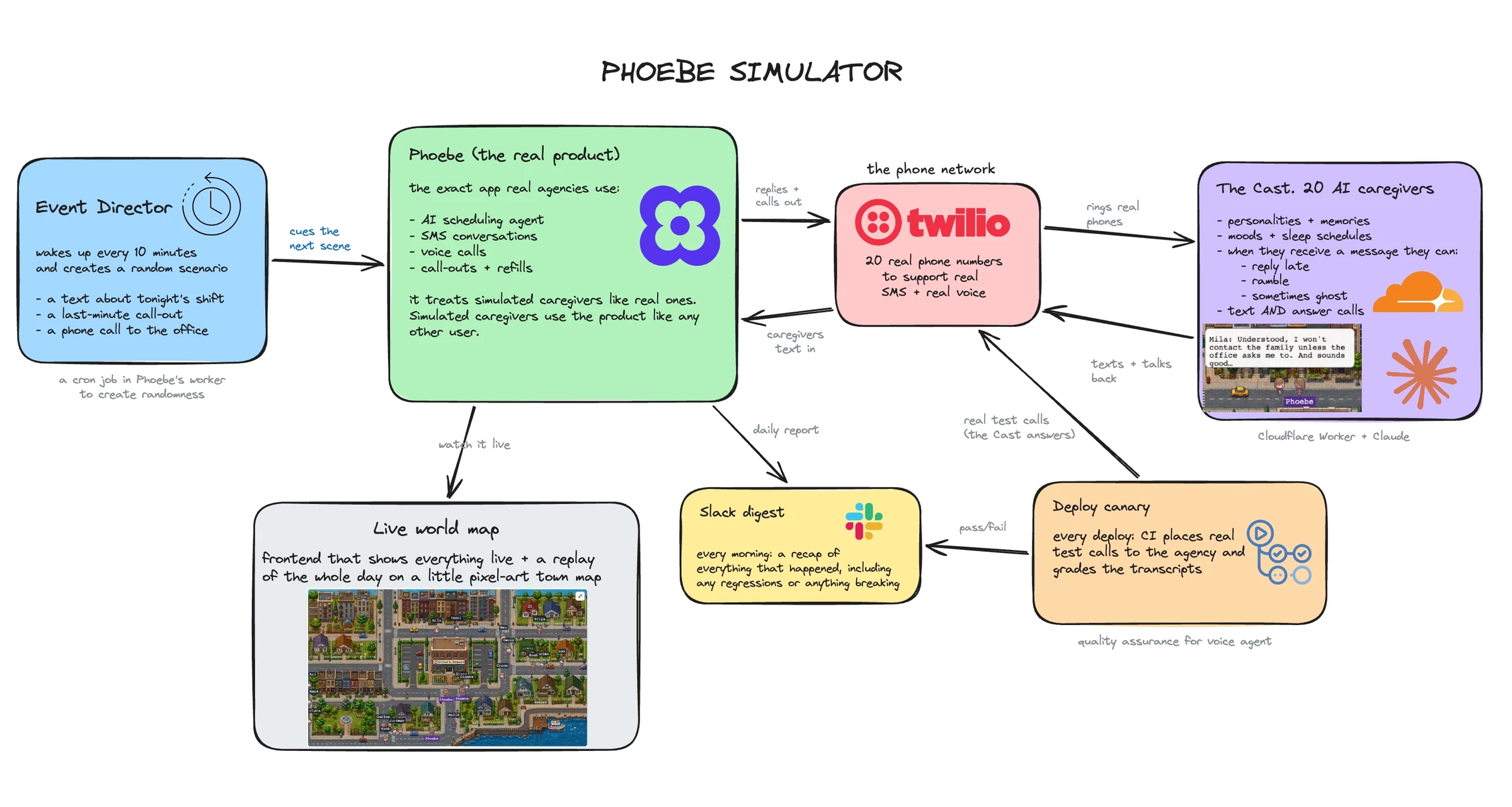
Behind the scenes, a cron job runs at regular intervals to generate new events based on the current state of the simulation. Each caregiver agent has a persistent identity with its own personality, schedule, and conversation history. Some caregivers are responsive and eager to pick up extra shifts, while others reply hours later, frequently call out, or ignore messages altogether. These traits influence how each agent responds and what events are likely to happen to them, so the same workflows play out differently across caregivers.
Because this state persists over time, agents remember what has already happened. A caregiver who called in sick earlier should not later act as if they are still working that shift, and someone who already declined an open shift should not suddenly accept it without context. As these decisions compound, the simulation develops into realistic, long-running workflows over days and weeks.
Each interaction produces structured telemetry and traces that capture the state of the simulation as it runs (more on this in the next section). This gives engineers end-to-end visibility into the entire system to investigate failures and understand how the product behaves over time.
Engineering Use cases
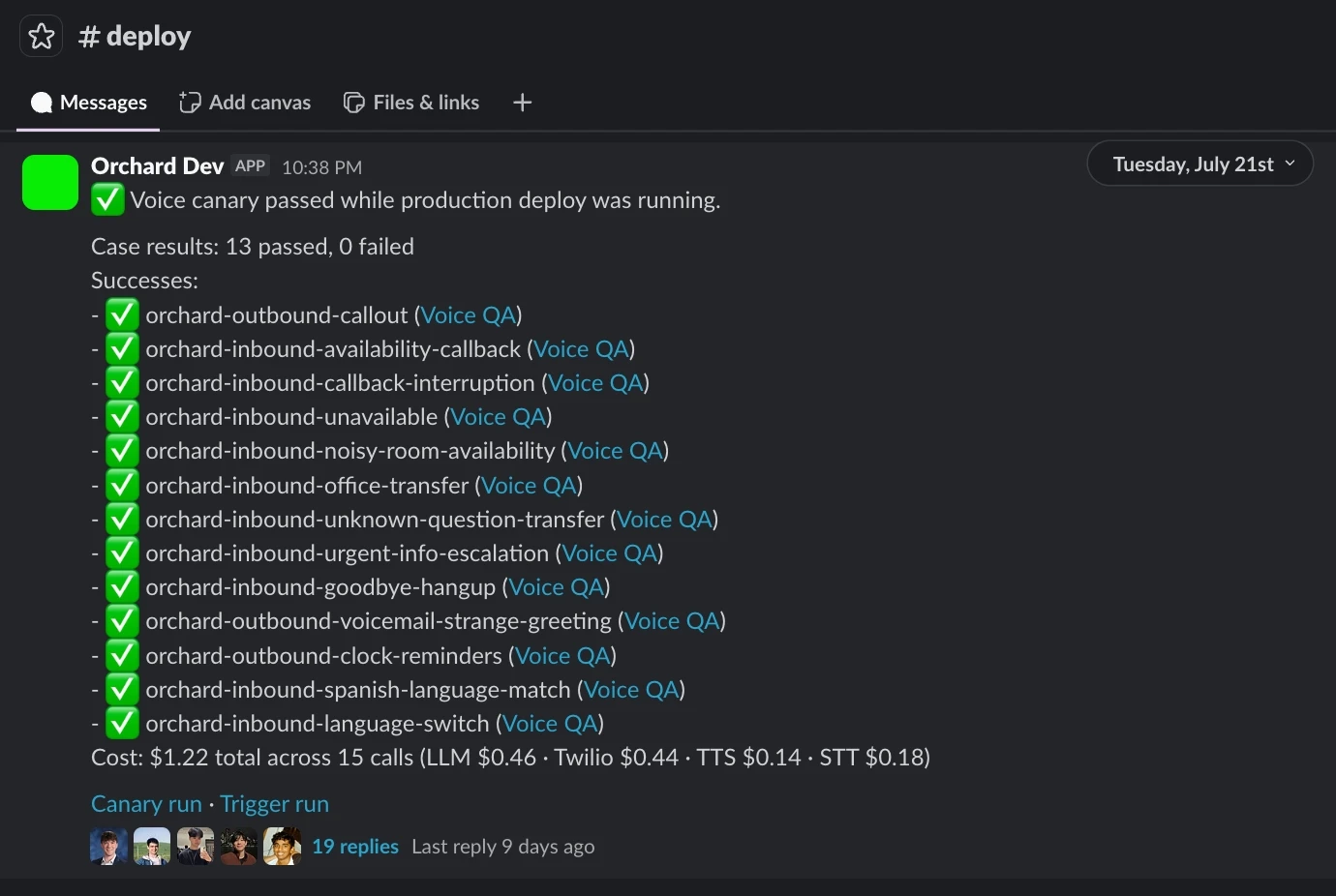
The simulation integrates directly with our engineering workflows. On every deployment, we run voice canaries to verify that our end-to-end voice pipeline is functioning correctly before changes are rolled out. Continuous monitoring surfaces regressions across the system, while alerts are reserved for failures that need attention. A daily Slack digest summarizes notable events and trends each morning, giving engineers a clear view of how the simulation is behaving without flooding them with noise.
Beyond monitoring, the simulation also acts as a safe rollout environment for new features. Since it runs as its own organization within our platform, we can enable feature flags there first without affecting any customer agencies. Instead of testing a new feature a handful of times, we let it run continuously and watch how it behaves across days of realistic conversations, calls, reminders, and scheduling workflows. By the time we roll it out to customers, we’ve already seen it handle a wide variety of scenarios and caught regressions that would have otherwise slipped through.
Sales Use Cases
The same simulation also serves as a powerful demo environment for our sales team. Because it runs continuously, it naturally accumulates weeks of realistic conversations, shift updates, reminders, and other workflows that would otherwise need to be manually recreated.
Instead of always seeding a fresh database, we can jump into an environment with ongoing conversations, historical context, active shifts, and completed workflows whenever we have a demo. It helps make demos feel much closer to what customers actually experience after using the platform for weeks, while giving our sales team a safe, fully synthetic environment since we can’t use real customer data.
What it caught
After building the simulator, we caught a few issues before they hit production. A few notable ones include:
- Deaf Phoebe. A config change broke our speech-to-text. Calls still connected and Phoebe still talked, but it couldn’t hear a single word the caregiver said.
- Phoebe talking to voicemails. A breaking change caused Phoebe to fail at detecting when a call had gone to voicemail. Instead of leaving a message, it would continue the conversation as if someone had answered.
- Reminders silently failed. After a phone number migration, caregivers’ clock-in confirmation texts stopped arriving with no alerts. The daily digest caught it the next morning.

Conclusion
At Phoebe, we’re always trying to raise the floor. That means increasing the consistency and quality of our customer-facing AI agents. Unit tests and evals remain an essential part of that process, but the simulator adds another layer, giving us greater confidence before we ship features and changes to our customers.

Inspirations
Work with Phoebe
We're building digital workers to coordinate the physical economy. Come build them with us.